
Turn website visits into conversations
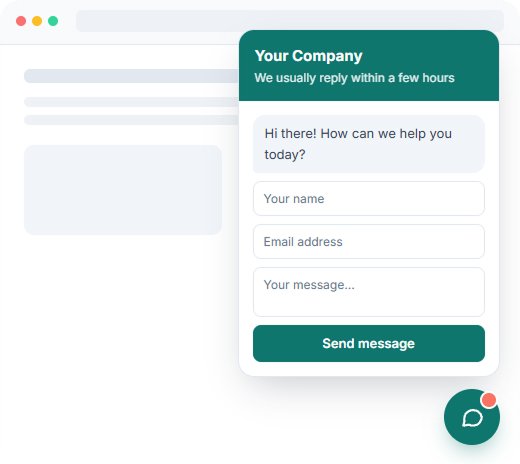
LeadPerch adds a friendly chat-style contact form to every page of your site. Messages are saved in WordPress, and your team is alerted by email, Slack, or webhook.
- 100% free, GPL licensed
- No third-party requests by default
- Set up in minutes
Built for
Small businesses
Agencies
Service providers
Online stores
Anyone who wants to be easy to reach
How it Works
From first message to follow-up in three steps
A visitor sends a message
The floating chat button sits on every page. Visitors open it, add their name, email and question, and hit send. No hunting for a contact page.
It's saved in WordPress
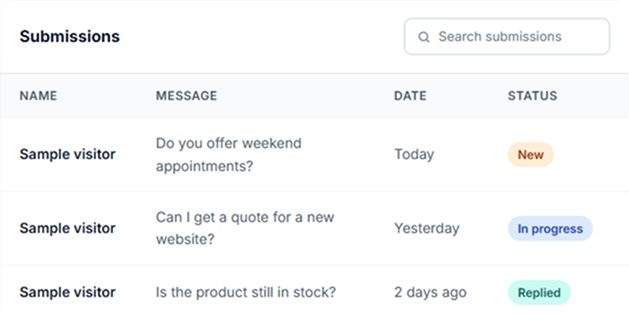
Every enquiry is stored in your own database and listed under LeadPerch › Submissions, ready to search, update or delete.
Your team is alerted
LeadPerch instantly notifies the right people by email, posts to Slack, or sends the lead to your CRM through a webhook.
Watch the demo
See LeadPerch in action
A quick walkthrough: install the plugin, set up the widget and receive your first lead.
1 Install & activate
2 Customise the widget
3 Set up notifications
4 Receive your first lead
Features
Everything you need to capture leads, nothing you don't
A lightweight widget with the essentials built in.
Floating chat widget
A clean chat-style contact form that stays visible on every page, on the left or right of the screen.
Submissions dashboard
View, search, update the status of and delete every enquiry, right inside your WordPress admin.
Email notifications
Alert several people at once, with optional CC and BCC recipients for managers or shared inboxes.
Slack & webhooks
Post new leads to a Slack channel, or send them to your CRM and automation tools with signed webhooks.
Spam protection
A hidden honeypot field, per-IP rate limiting and an optional cooldown keep junk submissions out.
Privacy tools
Works with WordPress's personal-data export and erase tools, plus automatic deletion of old submissions.
Make it yours
A widget that looks like part of your brand
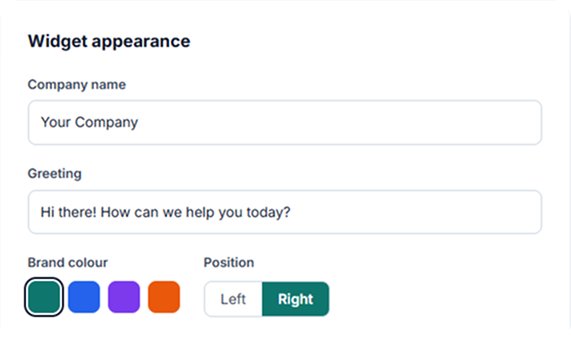
- Your company name, greeting and teaser message
- Your own brand colours
- Left or right screen position
- Logged-in visitors' name and email filled in automatically
Send to multiple recipients separated by commas or semicolons, with optional CC and BCC.
Slack
Paste a Slack incoming-webhook URL and new messages appear in your channel.
Webhook
Connect a CRM or automation tool. Sign each request with a secret so the receiver can verify it.
Instant notifications
Never miss an enquiry again
All in one place
Every lead, saved in your dashboard
No lost emails, no scattered inboxes. Every message lives in your own WordPress database, so you have a full record of who got in touch and when.
Search the list, mark enquiries as you handle them, and delete what you no longer need.
Privacy & protection
Respectful of your visitors, tough on spam
Your data stays on your server. Nothing leaves your site unless you set up a notification channel yourself.
No external requests
The widget makes no third-party calls. Visitor IP and country are worked out on your own server.
Privacy request ready
Connects to WordPress's Export and Erase Personal Data tools. Set a retention period to delete old submissions automatically.
One functional cookie
Only set when a visitor closes the teaser, to hide it for 24 hours. No personal data, no tracking.
One functional cookie
Only set when a visitor closes the teaser, to hide it for 24 hours. No personal data, no tracking.
FAQ
Questions, answered
Is this a live-chat service?
No. LeadPerch is a chat-style contact widget. Visitors leave a message and their contact details, and you reply through your normal email or support process. It does not provide real-time agent-to-visitor messaging.
Where can I see visitor messages?
Go to LeadPerch › Submissions in your WordPress dashboard. You can review messages, search the list, update their status or delete them.
Can I notify more than one person?
Yes. Add several email addresses separated by commas or semicolons, and use the Add CC and Add BCC links for copy recipients. You can also notify Slack and a webhook at the same time.
Does the plugin send visitor data to external services?
Not by default. The widget makes no third-party requests. Data only leaves your site through notification channels you set up yourself: email, a Slack incoming webhook, or a webhook URL you enter.
Does it set any cookies?
Just one functional cookie, leadperch_teaser_dismissed, set only when a visitor closes the teaser message. It hides the teaser for 24 hours, stores only the value 1, and is never used for tracking.
Why am I not receiving email notifications?
LeadPerch uses WordPress email delivery. Check the recipient address and that email notifications are enabled. If messages still don’t arrive, your host may need SMTP configured through an SMTP plugin or your hosting provider.
What happens when I uninstall the plugin?
By default your submissions and settings are kept. Turn on the option to delete all stored submissions and settings on uninstall if you want a clean removal.
Start turning visitors into leads today
Free on WordPress.org. Install it, add your company name and notification details, and you're live.
Requires WordPress 5.9+ and PHP 7.4+ · GPLv2 or later